ReShoot: AI Photos & Edits
- 4.6
- Rating
- 100.00K
- Installs
- Free
- Price

 Analysis by App-foxy
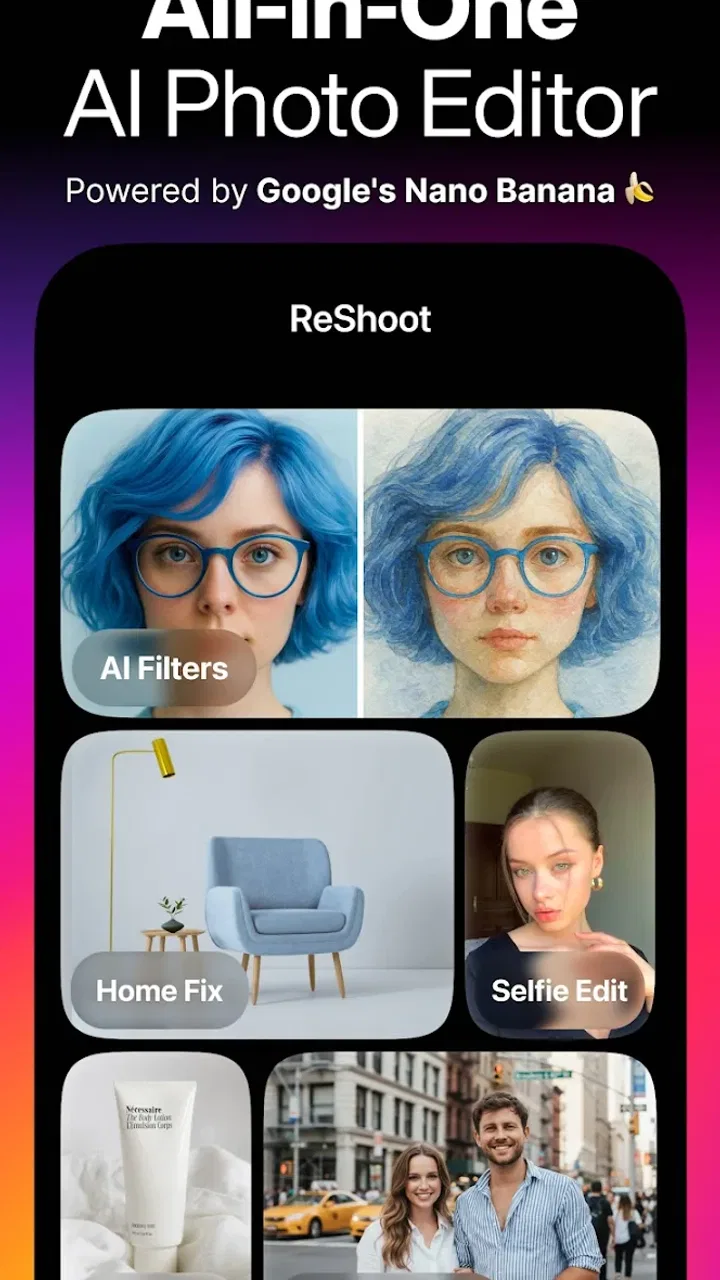
I opened ReShoot: AI Photos & Edits expecting a quick photo-effects app, but its wider focus became clear after a few edits. This Lifestyle app from HubX is built around AI-assisted image creation and transformation, with tools aimed at portraits, filters, tattoos, hairstyles, and more polished professional-looking pictures. I found it most interesting when I treated it as a visual idea generator rather than a complete replacement for a traditional editor.
The app is free to install and is rated for Everyone, which makes it easy to try without committing money at the start. Its current version is 1.4.2, and it requires Android 9 or later. The store presence shows a 4.6 average from around 4.4 thousand ratings, alongside more than 100 thousand installs. Those figures suggest that ReShoot has attracted a meaningful early audience, although I would still judge it by the quality of the results you can actually use.
How ReShoot fits into everyday photo editing
The simplest way to understand ReShoot is as a shortcut between an ordinary selfie and a more deliberately styled image. Instead of beginning with a blank canvas and adjusting every setting yourself, you start with a photo and explore AI-led changes. That makes the experience feel closer to trying visual directions than carefully retouching a finished photograph.
You May Also Like

 Pandora - Music & Podcasts
Pandora’s Music Is Easy to Start, but Harder to Recover
Pandora’s strength is its low-effort path from a seed to a station. Its weak spot is how much confidence it asks you to place in connection, setup, and quiet recovery.

 AccuWeather: Weather Radar
AccuWeather Review: A Quick, Clear Forecast for Everyday Decisions
For everyday plans, the best forecast is the one you can understand quickly. AccuWeather makes rain timing, radar, and local conditions easy to act on, with a few trade-offs.

 Hill Climb Racing
Why Hill Climb Racing Still Turns Crashes Into One More Run
A tiny car, a bumpy hill and one more upgrade: Hill Climb Racing keeps resurfacing because its simple chaos makes every near-miss feel personal.

 AliExpress - Shopping App
AliExpress Makes Global Shopping Feel Personal, but Shoppers Bear the Risk
AliExpress turns a global marketplace into a pocket-sized discovery engine. Its reach is useful, its shopping loop compelling, and its trade-offs easy to miss.

 Lords Mobile: Kingdom Wars
Lords Mobile Is a Kingdom-Building Routine, Not a Quick Match
A case-by-case verdict on the building, battles, device demands, and social commitments that make Lords Mobile rewarding for some players and exhausting for others.

 PDF Scanner app - TapScanner
TapScanner Makes Paperwork Easier to Capture, Check, and Share
TapScanner makes scanning with a phone feel less like a rescue operation and more like a dependable step in getting work done. Its capture tools are useful, though not flawless.
More From Our News Desk
View All News


I can see the appeal immediately for profile pictures, social posts, casual experimentation, and anyone who wants to preview a different look without arranging a full photo session. The hairstyle and tattoo concepts are especially useful as visual mock-ups. They do not need to be treated as final decisions; they can simply help you decide whether a certain direction suits your face and personal style.
The professional-shot angle is also practical, but it needs realistic expectations. An AI-enhanced portrait can give you a cleaner, more intentional image for a profile or introduction, yet it cannot replace the advantages of a real camera, suitable lighting, natural expression, and an accurate likeness. I would use ReShoot to improve presentation, not to create a misleading version of myself.
What the free starting point really means
ReShoot costs nothing to download, so the first step is low risk. That matters because AI photo apps are difficult to evaluate from a short description alone. The useful question is not whether the installation is free, but how much of the experience remains worthwhile before paid items become relevant.
In this case, the app includes in-app purchases ranging from $2.99 to $69.99 per item. That is a wide spread, so I would avoid assuming that every style or result is included at no cost. The sensible approach is to explore the free side first, decide whether the visual quality matches your needs, and only then consider paying for a particular result.
I like this arrangement for casual users who want to experiment, but it requires attention at the moment a purchase is offered. A single inexpensive option and a much higher-priced item can represent very different levels of commitment. Before confirming anything, I would check exactly what the selected purchase unlocks and whether it is useful for a one-time project or repeated editing.
That distinction changes the value calculation. Someone who wants one attractive portrait may find a paid result worthwhile if it saves the time and cost of arranging a professional shoot. Someone who edits images every week may prefer a conventional editor with predictable tools and a clearer long-term workflow. ReShoot is easiest to justify when its AI transformations solve a specific visual problem rather than becoming an impulse purchase.
Where the app delivers more than a basic filter
The stronger idea here is the ability to compare possible versions of yourself quickly. A normal filter changes color, contrast, or mood, while ReShoot’s focus reaches into appearance and presentation. That makes it more useful for brainstorming. You can think through a new hairstyle, test the atmosphere of a portrait, or explore a tattoo placement before making a real-world decision.
One useful workflow is to begin with a simple, well-lit image and change only one visual direction at a time. If you alter the hairstyle, tattoo concept, and overall style in one pass, it becomes difficult to tell which change actually works. Keeping the source photo consistent gives you a fairer comparison and reduces the temptation to choose an edit simply because every element looks different.
Another practical tip is to prepare several source photos rather than relying on the first selfie in your camera roll. A front-facing image, a slightly turned pose, and a photo with a relaxed expression can produce very different impressions. Even when the app is doing much of the creative work, the starting image still influences whether the result feels believable.
I also found that AI-styled images work best when I treat them as drafts. The first output may have the right mood but the wrong emphasis, or it may look polished while losing something recognizable about the original person. Comparing multiple attempts helps, but I would save the original image separately and avoid overwriting it. This is basic photo hygiene, yet it matters more when an app encourages rapid transformations.
A realistic use case: preparing a new profile image
Imagine that you need a new profile photo for a community group, a portfolio introduction, or a social account. You do not have time to organize a photo session, and your existing pictures are either too casual or poorly framed. ReShoot can help you explore a more finished look from a suitable portrait.
I would start with a recent photo that still looks like me, then try a restrained professional treatment rather than the most dramatic style. After that, I would compare the result at the small size where people will actually see it. Fine details that look impressive when zoomed in may disappear in a profile thumbnail, while exaggerated smoothing can make the face look artificial.
The best result in that situation is not necessarily the most transformed one. It is the image that remains recognizable, has a clear expression, and looks appropriate for the setting. This is where ReShoot can be helpful: it gives you more directions to consider. It does not remove the need for judgement about context, authenticity, and how the image will be received.
Creative uses beyond profile pictures
For personal style decisions, the app can function as a low-pressure preview tool. A hairstyle transformation may help you discuss an idea with a stylist, while a tattoo concept can help you think about placement and overall balance. I would not treat either as an exact prediction of a real haircut or tattoo, because hair texture, head shape, skin, and lighting will affect the final result outside the app.
There is also value in using the edits as mood boards. If you are planning a themed event, a personal photo project, or a refreshed online identity, several generated looks can reveal which colors, shapes, or levels of formality feel consistent. The important insight is to look for recurring preferences across different images instead of becoming attached to one unusually flattering output.
For creators, ReShoot may help with early visual planning. You could use a transformed portrait to discuss a concept before investing in makeup, clothing, or photography. That saves effort at the idea stage, although the final production still needs real-world testing. AI images can suggest a direction without proving that the direction will work in practice.
Tradeoffs compared with familiar alternatives
Compared with a traditional mobile editor, ReShoot appears better suited to fast, imaginative changes than precise manual correction. A conventional editor gives you direct control over exposure, cropping, color, sharpening, and small retouching decisions. That is preferable when you already know what needs fixing and want the result to remain tightly connected to the original photograph.
Compared with a standard filter app, ReShoot offers a broader styling concept. Filters usually change the atmosphere of the same image, whereas AI-driven transformations can suggest a different presentation of the person. The tradeoff is control: a simple filter is predictable, while an AI result may look more striking but less faithful.
Compared with booking a professional photographer, the app is faster and much easier to access. It is useful for testing ideas and producing a presentable image when the stakes are modest. A photographer remains the better choice for important business portraits, formal announcements, or situations where accurate identity and consistent lighting matter more than experimentation.
Compared with a design tool, ReShoot is likely to appeal more to people who want the image itself changed rather than a full layout built around it. If you need typography, brand templates, layered graphics, or detailed composition, a dedicated design application will usually be the stronger option. ReShoot makes more sense earlier in the process, when you are still deciding what visual style you want.
Limitations I would keep in mind
The biggest limitation of AI photo editing is the gap between visual novelty and dependable accuracy. A result can look attractive at first glance while subtly changing facial structure, hair details, or the relationship between the subject and the background. For a playful post, that may be acceptable. For an image that represents you professionally or personally, I would inspect it carefully before sharing.
Style selection can also create decision fatigue. Having many possible directions sounds useful, but too many dramatic variations can make it harder to settle on a consistent identity. I recommend choosing a purpose before opening the editor: a natural profile image, a hairstyle preview, a tattoo idea, or a creative portrait. A clear goal keeps the session from turning into endless scrolling through versions.
There is a practical cost issue as well. Free access makes testing comfortable, but the purchase range means the app should not be treated as an unlimited source of premium transformations without checking the individual offer. If you only want occasional edits, paying for one carefully chosen result may be reasonable. If you expect frequent, detailed adjustments, the economics may favor another editing setup.
I would also skip ReShoot if you want complete manual control over every stage of the image. Its appeal lies in speed and transformation, not in replacing the careful workflow of a photographer, retoucher, or designer. People who dislike AI-generated changes to personal appearance may find the central concept unconvincing, even when the results are technically polished.
Who is most likely to get good value
ReShoot is a strong match for curious users who enjoy trying new looks without making an immediate real-world commitment. It is particularly suitable for someone choosing a profile image, exploring a hairstyle, imagining tattoo ideas, or looking for a more polished portrait from an ordinary photo.
It can also suit users who need a quick visual starting point and do not want to learn a complicated editing interface. The app’s value comes from reducing the distance between an idea and an image. You still need to choose a good source photo and judge the output, but you do not have to build every effect manually.
I would be more cautious recommending it to professional photographers, advanced retouchers, and people who need repeatable brand consistency. Their priorities are likely to include exact adjustments, reliable continuity between images, and detailed control. ReShoot may still be useful for inspiration, but it should not be their only tool.
Parents and younger users should also remember that an Everyone age rating does not make every edited image suitable for every context. The app can be used innocently for style experiments, yet images still deserve the same care as any personal photos shared online. I would keep original files, review generated results before posting, and avoid presenting an imagined appearance as a factual one.
My buy-or-skip verdict
I would recommend trying ReShoot if you want fast AI-assisted portrait ideas, appearance previews, or a more creative alternative to ordinary filters. The free installation lowers the barrier to testing, and the app has enough range to be useful for more than a single novelty edit. Its best role is as a visual sandbox that helps you decide what kind of image or personal style you want.
I would not recommend paying immediately. Start with a clear use case, test the available experience, and judge whether the outputs preserve enough of your real appearance. If one result solves a genuine need and the specific purchase feels reasonable, paid access may offer good value for that project. If you only enjoy the surprise of random transformations, spending money is harder to justify.
My final view is positive but measured: ReShoot is more compelling for exploration than for precision. HubX has positioned it as a Lifestyle app for AI photos and edits, and that description fits the way I would use it. It can save time, open up styling ideas, and produce a polished starting point, but it cannot replace human taste or specialist tools. Try it for the idea, inspect it for the truth, and pay only when a specific result earns its place.
FAQs for ReShoot: AI Photos & Edits
01What is ReShoot: AI Photos & Edits used for?
ReShoot: AI Photos & Edits is designed for creating and enhancing images with artificial intelligence. It can help users transform ordinary photos, apply creative visual effects, improve portraits, and experiment with different editing styles. The app is aimed at people who want quick, social-media-ready results without spending a long time using complex professional editing software.
02Does ReShoot require an internet connection to work?
Most AI-powered features in ReShoot are likely to require an active internet connection because photos may need to be processed on remote servers. Basic functions, such as opening the app or viewing previously saved images, may work offline, but the main generation and enhancement tools can be limited without connectivity. A stable Wi-Fi or mobile-data connection is recommended for smoother processing.
03Is ReShoot: AI Photos & Edits free to download and use?
ReShoot can generally be downloaded at no initial cost, but some features, editing tools, effects, or export options may be restricted behind in-app purchases or a subscription. Before starting a trial, users should carefully check the pricing, renewal terms, and cancellation process shown in the app store. Free access may also include limits on usage or image generations.
04Are my photos safe when using ReShoot?
Because ReShoot uses AI editing and generation tools, selected images may be uploaded or processed by the app’s servers. Users should review the application’s privacy policy to understand how photos, account information, and generated content are handled, stored, or deleted. Avoid uploading highly sensitive images unless you are comfortable with the stated data practices and permissions.
05Can edited images from ReShoot be saved and shared on social media?
ReShoot is primarily intended to produce images that can be saved to a device and shared through platforms such as Instagram, TikTok, Facebook, or messaging apps. Export quality, resolution, available file formats, and possible watermarks may depend on the selected tool or subscription plan. It is worth checking the final preview before saving, especially when using free features.
Pros
- Creates creative AI portraits from ordinary photos.
- Offers multiple editing styles for varied social media content.
- Simple interface makes experimenting with edits easy.
- Useful for quick profile pictures and themed images.
- Results can be saved and shared directly from the app.
Cons
- High-quality generations may require a paid subscription.
- Some AI results can look artificial or inconsistent.
- Processing times may vary depending on server demand.
- Uploading personal photos raises privacy considerations.
- Certain styles or tools may be locked behind in-app purchases.

ReShoot: AI Photos & Edits
Gallery